rss2array downloads a remote RSS 0.91 feed and puts most of the useful info into a PHP array. Other feed formats may work too.
I've found this document on site http://www.rssmix.com
and lastRSS.php from site http://lastrss.oslab.net/ is simple yet powerfull PHP class to parse RSS.
kill -9 -1
Kill all process you can kill
ps aux
List all my process
top -d sec
Display Linux task on top of screen
TOP(1) Linux User's Manual
TOP(1) NAME top - display Linux tasks
SYNOPSIS
top -hv | -bcisS -d delay -n iterations -p pid [, pid ...]
The traditional switches '-' and whitespace are optional.
DESCRIPTION
The top program provides a dynamic real-time view of a running system. It can display system summary information as well as a list of tasks currently being managed by the Linux kernel. The types of system summary information shown and the types, order and size of information displayed for tasks are all user configurable and that configuration can be made persistent across restarts.
The program provides a limited interactive interface for process manipulation as well as a much more extensive interface for personal configuration -- encompassing every aspect of its operation. And while top is referred to throughout this document, you are free to name the program anything you wish. That new name, possibly an alias, will then be reflected on top's display and used when reading and writing a configuration file.
MySQL is no longer enabled by default, so the phpmysql.dll DLL must be enabled inside of php.ini. Also, PHP needs access to the MySQL client library. A file named libmysql.dll is included in the Windows PHP distribution and in order for PHP to talk to MySQL this file needs to be available to the Windows systems PATH. See the FAQ titled "How do I add my PHP directory to the PATH on Windows" for information on how to do this. Although copying libmysql.dll to the Windows system directory also works (because the system directory is by default in the system's PATH), it's not recommended.
As with enabling any PHP extension (such as phpmysql.dll), the PHP directive extensiondir should be set to the directory where the PHP extensions are located. See also the Manual Windows Installation Instructions. An example extensiondir value for PHP 5 is c:\php\ext
วันนี้กลับเข้ามาเช็คข้อมูลที่สถาบันทักษิณคดีศึกษา เกาะยอ ได้กลับมานั่งทำงานในเครื่องเดิมที่เคยมานั่งพัฒนาฐานข้อมูลให้ทางสถาบันเมื่อปีที่แล้ว เครื่องที่ใช้เป็น HP ใช้ LCD Monitor ของ HP รุ่น HP vs19e มีความรู้สึกว่าภาพและตัวอักษรมีความคมชัดมากกว่า Samsung Monitor ที่บ้านเยอะมากเลย
แต่ว่า ราคาก็คงต่างกันหลายเหมือนกันสินะ.
วันนี้ได้ไปอ่านกระทู้ ทำไม ip ต้องเป็น 192.168.1.x คะ เห็นว่าเป็นเรื่องน่าสนใจ ผมก็สงสัยเหมือนกัน เลยเอามาลงเก็บไว้ เป็นอ้างอิงวันเลังได้ครับ.
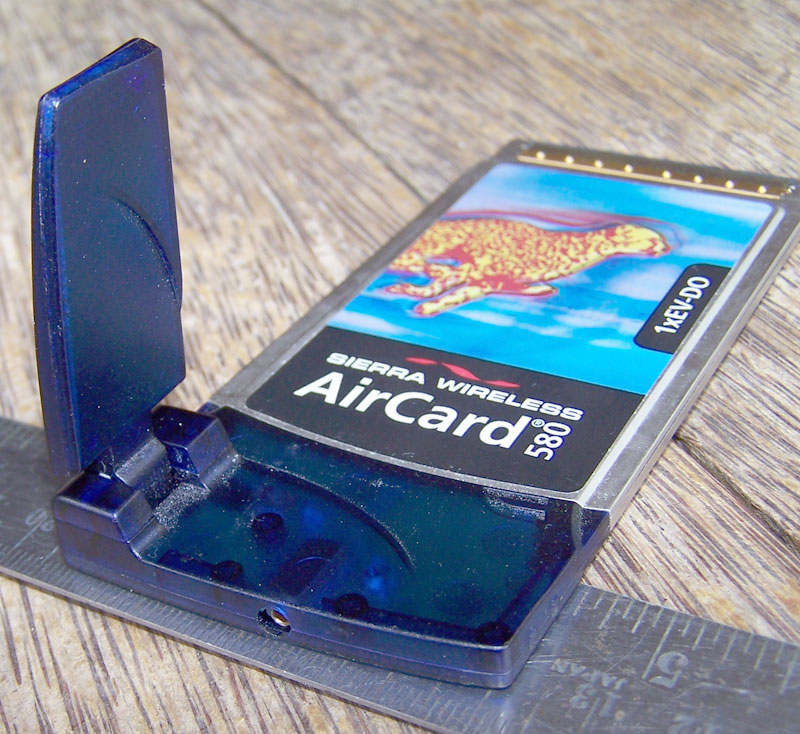
ผมเพิ่งได้ AirCard อันแรกในชีวิตมาใช้งานเมื่อสัก 2 เดือนมาแล้ว เป็นของ CAT CDMA ที่ยังไม่ได้เปิดใช้งานเป็นทางการ (เรียกว่าเส้นใหญ่ เอามาใช้ก่อน) CAT CDMA เป็นเครือข่าย 3G แห่งแรกในประเทศไทยกระมัง สามารถทำงานได้ 2 ระบบ คือ
1xCDMA ความเร็วประมาณ 100 kbps กว่า
EVDO ความเร็วตามสเปคระบุไว้ที่ 1mbps แต่ผมลองใช้งานจริงได้ประมาณ 4-500 kbps
ถาม: ผมซื้อจอแอลซีดีจากร้านค้าแถวบ้านมาใช้ได้ประมาณ 3 เดือนกว่าๆ แล้ว แต่เพิ่งจะสังเกตเห็นว่า มันมี 3 - 4จุดบริเวณกลางหน้าจอเป็นจุดสีแดงค้างเติ่งอยู่อย่างนั้น ผมกลุ้มใจมาก ยกไปเปลี่ยนทางร้านก็ไม่สามารถจัดการอะไรให้ได้แล้ว พอจะมีคำแนะนำบ้างไหมครับ
กำลังอยู่ในช่วงศึกษาวิธีการติดตั้งเครือข่าย VPN ลองไปค้นหาบทความจากแหล่งต่าง ๆ ก็ไปเจอเอาวิธีการติดตั้งเครือข่าย VPN จากบทความในเว็บไซท์ของ ARiP.co.th หรือ pcmagthailand.com ก็เลยเอาลิงค์มาแปะไว้ก่อนนะครับ
ตามลิงค์ ติดตั้งเครือข่าย VPN งานง่ายๆ สำหรับวินโดวส์ เอ็กซ์พี
นะครับ
I have received a few inquiries into my configuration of the Sierra 580 EvDO wireless card under Linux, so here is my tutorial on how to get that done. Enjoy!
I got the card working under Debian Sarge (3.1) with little modification. This method should work with all linux distributions with little or no modification. (Some of the following information was gleaned from other sites as I scanned the net for resources, so you may see bits and pieces of the following information across several sites on the net.)
Follow the steps as shown, and you should be able to connect just fine...
There is an initial assumption that the wireless card has already been activated by sprint (and probably used in windows at some point to verify that it works.)
1. Insert your wireless card and be sure that your computer recognizes it as a USB device. Look in dmesg for it. Once you have verified that it is recognized by your system, proceed to step 2.
2. Issue the following commands (you will need to sudo or su to do this)
# modprobe usbserial vendor=0x1199 product=0x0112
# mknod /dev/ttyUSB0 c 188 0
Next is the configuration of PPPD and the scripts needed.
3. Create a file named '1xevdo' with the following text, and place it in the '/etc/ppp/peers/' directory
lcp-echo-interval 0
-detach
ttyUSB0
115200
debug
noauth
defaultroute
usepeerdns
user 210xxxxxxx@sprintpcs.com
show-password
crtscts
lock
connect '/usr/sbin/chat -v -t3 -f /etc/ppp/peers/1xevdochat'
Be sure to replace '210xxxxxxx' with your wireless card's area code and 7 digit phone number.
4. Create another file, named '1xevdochat' with the text below and place in the ' /etc/ppp/peers/' directory.
'' 'AT'
'OK' 'ATE0V1&F&D2&C1&C2S0=0'
'OK' 'ATE0V1'
'OK' 'ATS7=60'
'OK' 'ATDT#777'
5. Use your text editor of choice (we all know it's vi) to add the following line to '/etc/ppp/pap-secrets'
210xxxxxxx@sprintpcs.com * zzzz
where '210xxxxxxx' is the phone number assigned to your card, and 'zzzz' is the password for your wireless card account (typically the last 4 digits of the phone number).
6. as root, issue the following command to connect to the internet
# pppd call 1xevdo
--------
That's all the instructions for the process, and hopefully it will work for you. here are some observations I have:
If you get a 'connect script failed' type of error, and you are sure that you followed the instructions, remove the wireless card and reinsert it. This is what I had to do to get my card to work properly.
The modprobe and mknod commands will need to be re issued every time you reboot. You will not need to recreate the files and scripts. You can automate the scripts for modprobe and mknod if you wish. I will post more on the automation later.
You will get two types of output when your attempt to run the script. Either you will get an error (failed connection script), or you will get a long output similar to the following:
serial connection established.
using channel 2
Using interface ppp1
Connect: ppp1 <--> /dev/ttyUSB0
sent [LCP ConfReq id=0x1 ]
rcvd [LCP ConfReq id=0x0 ]
sent [LCP ConfAck id=0x0 ]
rcvd [LCP ConfReq id=0x1 ]
sent [LCP ConfAck id=0x1 ]
sent [LCP ConfReq id=0x1 ]
rcvd [LCP ConfAck id=0x1 ]
sent [LCP EchoReq id=0x0 magic=0xeda0c264]
sent [CCP ConfReq id=0x1 ]
sent [IPCP ConfReq id=0x1 < ms-dns3 0.0.0.0>]
rcvd [LCP DiscReq id=0x2 magic=0xee74136c]
rcvd [LCP EchoRep id=0x0 magic=0xee74136c ed a0 c2 64]
rcvd [IPCP ConfReq id=0x3 ]
sent [IPCP ConfAck id=0x3 ]
rcvd [LCP ProtRej id=0x4 80 fd 01 01 00 0f 1a 04 78 00 18 04 78 00 15 03 2f]
Protocol-Reject for 'Compression Control Protocol' (0x80fd) received
rcvd [IPCP ConfRej id=0x1 ]
sent [IPCP ConfReq id=0x2 ]
rcvd [IPCP ConfNak id=0x2 ]
sent [IPCP ConfReq id=0x3 ]
rcvd [IPCP ConfAck id=0x3 ]
not replacing default route to ppp0 [10.5.250.5]
Cannot determine ethernet address for proxy ARP
local IP address xx.x.xx.xx
remote IP address xx.xx.xxx.xx
primary DNS address xx.xx.xxx.xx
secondary DNS address xx.xx.xxx.xx
Script /etc/ppp/ip-up started (pid 4273)
Script /etc/ppp/ip-up finished (pid 4273), status = 0x0
Once you are connected, by seeing the above information in your terminal window, open a web browser and try to view some pages. If your browser cannot serve pages, you may need to edit your resolve.conf file manually and add the DNS servers that you see in the above output. This should get you on the road to full connectivity in linux!
If you have any questions, feel free to e-mail me at dryicezero [a-t] gmail.com.
//Ernest
ที่มา : http://dryicezero.blogspot.com/2005/12/sprint-sierra-580-evdo-card-linux.html